
in3 Business Developer Api documentation
Download OpenAPI specification:Download
Hi 👋,
Before you skip straight to the code please take a sip of your brew and read this block.
- in3 Business provides realtime developer to developer support for integration partners, join our Telegram group at this link and ask away.
- We are always open for suggestions or improvements
- Invalid requests might result in a security block. API suddenly refusing connection? Contact us.
- Client: Payment Service Provider (PSP)
- Customer: The user of the Shop that wants to purchase a service/good
- Merchant: Customer of the Client which owns shops or points of sale. The entity that is billed for in3 Business`s services
- Shop: Point of sale that belongs to a Merchant
If you have any questions regarding the integration with our Api, please contact one of the following:
Development:
- Email: contact@scenius.nl
- Telephone: 040 - 369 0149
Merchant/Shop/Customer:
- Email: support@business.payin3.nl
- Telephone: 088 - 39 93 333
in3 Business only accepts customers based in the Netherlands.
Note: Merchants can be onboarded as longs as they deliver to The Netherlands!
At in3 Business, we have a minimum and a maximum amount for an order you can make.
Minimum: 150 €
Maximum: 30 000 €
For merchant onboarding in3 Business provides two flows, namely:
- Ahead of time onboarding (Preferred)
- Inline onboarding (Legacy)
Before starting integration with in3 Business, check if all legal documents (KYC checks) and merchant contracting are covered in your onboarding!
With this onboarding method the merchant will be onboarded before the first in3 Business order/transaction has been made. This will require the Client to implement the onboarding API calls separately from the transaction calls and keep track of in3 Business's onboarding state. This method has our preference.
This method of onboarding is preferred way of integrating with in3 Business.
With this onboarding method, the merchant will be onboarded before the first in3 Business order (transaction) has been made. This will require the client to implement the onboarding API calls separately from the transaction calls and keep track of in3 Business`s state.
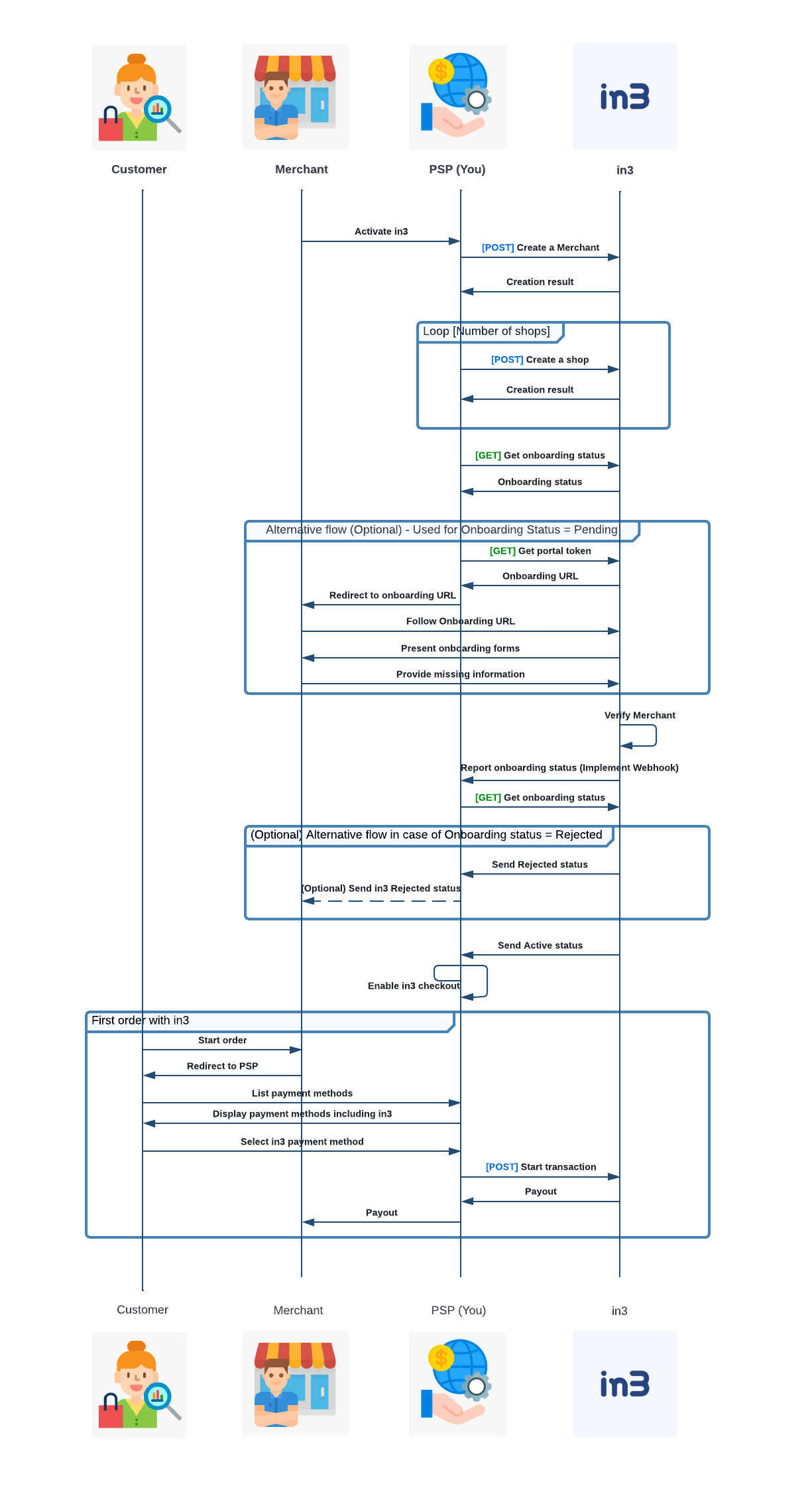
You (PSP) will call in3 Business with [POST Create a merchant] all information from merchant. After you do this call you will receive Creation result as response. Depending on that Creation result you will need to do call to [POST Create a shop] endpoint. You will need to call this method multiple times if merchant has multiple shops. Important step in flow is to call method [GET Get onboarding status]. Depending on response from in3 Business on this method you can have multiple alternative flows. PENDING flow, REJECTED flow, ACTIVE flow. Only when response to [GET Get onboarding] status is ACTIVE then user can initiate flow to start transaction. From PSP side this is done by calling [POST Start transaction]. Please also insure to implement webhook for receiving status in step "Report onboarding status".
Additional important information:
Please provide these fields in [POST Create a merchant] and [POST Create a shop] calls in order to skip implementing PENDING state.
- Create a Merchant: IBAN and Ascription fields are only required for Gateway solutions
- Create a Merchant: Only authorized Contact(s) field is required
- Create a Merchant: variableFee and fixedFee are nice to have
- Create a Shop: Categories field is best case. If available please provide a list so that we can make a mapping. MCC list is the preferred list to put here.
- Create a Shop: Expected traffic is optional unless otherwise specified by in3 Business
- Create a Shop: Platform is optional
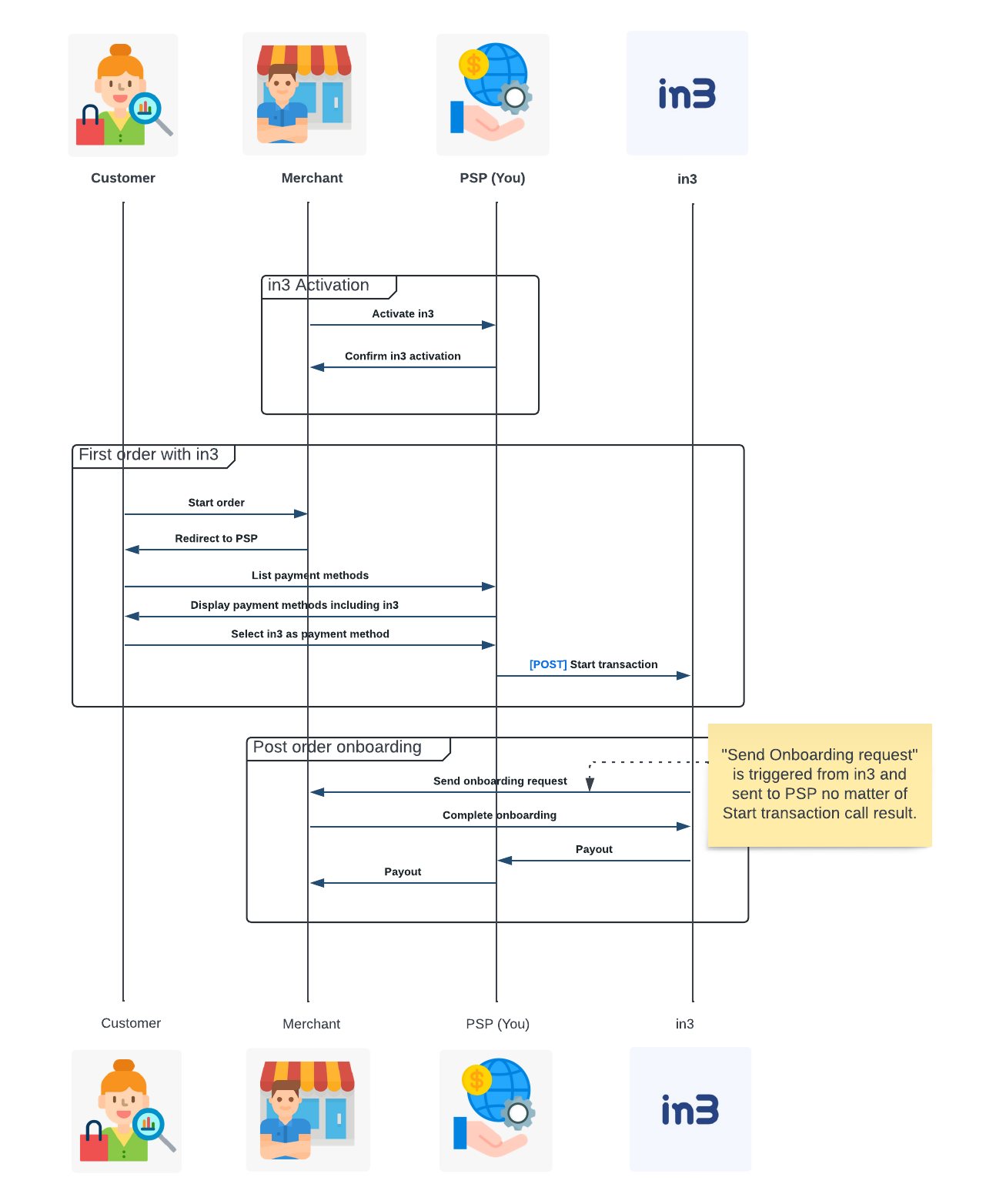
This is a NOT preferred method of onboarding, and it is considered Legacy. in3 Business recommends to use the "Ahead of time onboarding" method, as this (inline onboarding) method can cause inconvenience to the merchant.
Important information: The "initial/first" customer will be able to complete the order as expected. in3 Business will also report "PAID", but in3 Business will not pay out the PSP for the completed order until [POST Order onboarding] is completed.
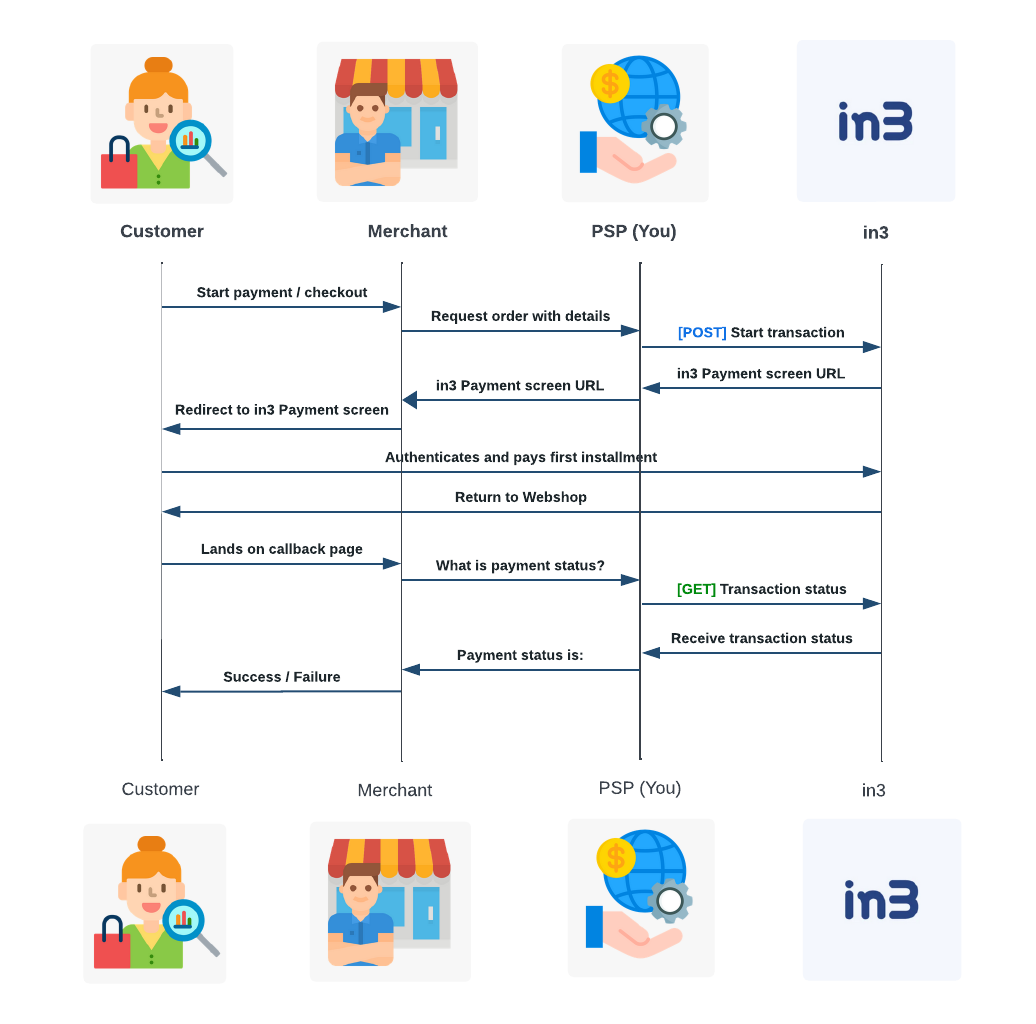
Transaction start
Starts an in3 transaction.
Note: At in3 we always prefer that you provide array of invoiceLines in your Api call, if it`s not possible to provide the invoiceLines, we can work around it.
Please contact us on: product@payin3.nl
Authorizations:
Request Body schema: application/json
required | object (CustomerInfo) |
object (InvoiceInfo) | |
required | Address (object) Address where the products will be shipped |
(Address (object or null)) Address where the invoice will be sent, same as shipping address when null | |
Array of objects (InvoiceLine) | |
required | object (ApiOptions) |
(Psper (object or null)) PSPer only! Used by PSPers to facilitate in3 transactions for connected shops |
Responses
Callbacks
Request samples
- Payload
{- "customerInfo": {
- "id": "012afad1-6a66-4177-9447-798d5de2f16d",
- "firstName": "Nick",
- "initials": "N.K.G.",
- "lastName": "Vliet",
- "dateOfBirth": "1998-07-17",
- "phoneNumber": "+31651267472",
- "email": "debtor@mail.scenius.nl",
- "fax": null,
- "isBusiness": false,
- "businessName": "Hogeschaar B.V.",
- "cocNumber": "70528500"
}, - "invoiceInfo": {
- "invoiceAmount": 42656,
- "vatTotal": 8957,
- "invoiceReference": "IN3242",
- "invoiceDescription": "API Test Order",
- "invoiceDate": "2020-01-01",
- "invoiceUrl": null
}, - "shippingAddress": {
- "addressedTo": "Scenius",
- "street": "Collse Heide",
- "city": "Nuenen",
- "houseNumber": "50",
- "houseNumberSuffix": "C",
- "postalCode": "5674 VN",
- "region": "Noord-Brabant",
- "countryCode": "NL"
}, - "invoiceAddress": {
- "addressedTo": "Scenius",
- "street": "Collse Heide",
- "city": "Nuenen",
- "houseNumber": "50",
- "houseNumberSuffix": "C",
- "postalCode": "5674 VN",
- "region": "Noord-Brabant",
- "countryCode": "NL"
}, - "invoiceLines": [
- {
- "code": null,
- "type": "product",
- "description": "Ergonomic Concrete Table",
- "productCategory": "Tables",
- "quantity": 2,
- "unitPrice": 21328,
- "quantityDescription": "pieces",
- "price": 42656,
- "vatPercentage": 21,
- "vatAmount": 8957,
- "expectedDeliveryDate": "2021-01-01"
}
], - "apiOptions": {
- "expiresOn": "2030-10-08T09:10:35Z",
- "interfaceLocaleOverride": "nl",
- "route": "in3",
- "isTest": true
}, - "pspOptions": {
- "pspTransactionIdentifier": "0f9effab-6b7e-4315-b0e8-f9dcbaa8033c",
- "merchantInfo": {
- "internalMerchantId": "80041fe3-266b-4006-9579-03bd8ced0b04",
- "merchantName": "DemoMerchant Financial Asset Holding G.M.B.H.",
- "method": "IN3GRNT",
- "legalAddress": {
- "street": "Collse Heide",
- "city": "Nuenen",
- "houseNumber": "50",
- "houseNumberSuffix": "C",
- "postalCode": "5674VN",
- "region": "Noord-Brabant",
- "countryCode": "NL"
}, - "cocNumber": "70528500",
- "vatNumber": "NL999999999B99",
- "iban": "NL63RABO7608092459",
- "ascription": "DemoMerchant Financial Asset Holding G.M.B.H.",
- "authorizedContact": {
- "firstNames": "Henk",
- "lastName": "Jansen",
- "email": "h.jansen@payin3.nl",
- "phoneNumber": "+31651267472"
}, - "financialContact": {
- "firstNames": "Henk",
- "lastName": "Jansen",
- "email": "h.jansen@payin3.nl",
- "phoneNumber": "+31651267472"
}, - "marketingContact": {
- "firstNames": "Henk",
- "lastName": "Jansen",
- "email": "h.jansen@payin3.nl",
- "phoneNumber": "+31651267472"
}, - "supportContact": {
- "firstNames": "Henk",
- "lastName": "Jansen",
- "email": "h.jansen@payin3.nl",
- "phoneNumber": "+31651267472"
}, - "technicalContact": {
- "firstNames": "Henk",
- "lastName": "Jansen",
- "email": "h.jansen@payin3.nl",
- "phoneNumber": "+31651267472"
}, - "variableFee": 3.4,
- "fixedFee": 949.99,
- "merchantPayoutDate": 7,
- "pspPayoutDate": 7,
- "thirdPartyReseller": "Scenius"
}, - "shopInfo": {
- "internalShopId": "1529251e-2d0d-4532-86c8-7b2c711fddc7",
- "name": "DemoMerchant",
- "shopAddress": {
- "street": "Collse Heide",
- "city": "Nuenen",
- "houseNumber": "50",
- "houseNumberSuffix": "C",
- "postalCode": "5674VN",
- "region": "Noord-Brabant",
- "countryCode": "NL"
}, - "categories": [
- "Televisions"
], - "customerSupportPhone": "+31403690149",
- "customerSupportEmail": "support@payin3.nl",
- "platform": "Magento2",
- "expectedTraffic": 1500,
- "fixedFee": 1.5,
- "variableFee": 1.5,
- "mccCode": "1234",
- "mccDescription": "Mollie"
}
}
}Response samples
- 200
- 400
{- "transactionIdentifier": "0af7c4b50f894420bc1ec565974bbf64fWBHL2tpvbhs3WQoN2MlPlR",
}Transaction status
Gets the status of an in3 transaction.
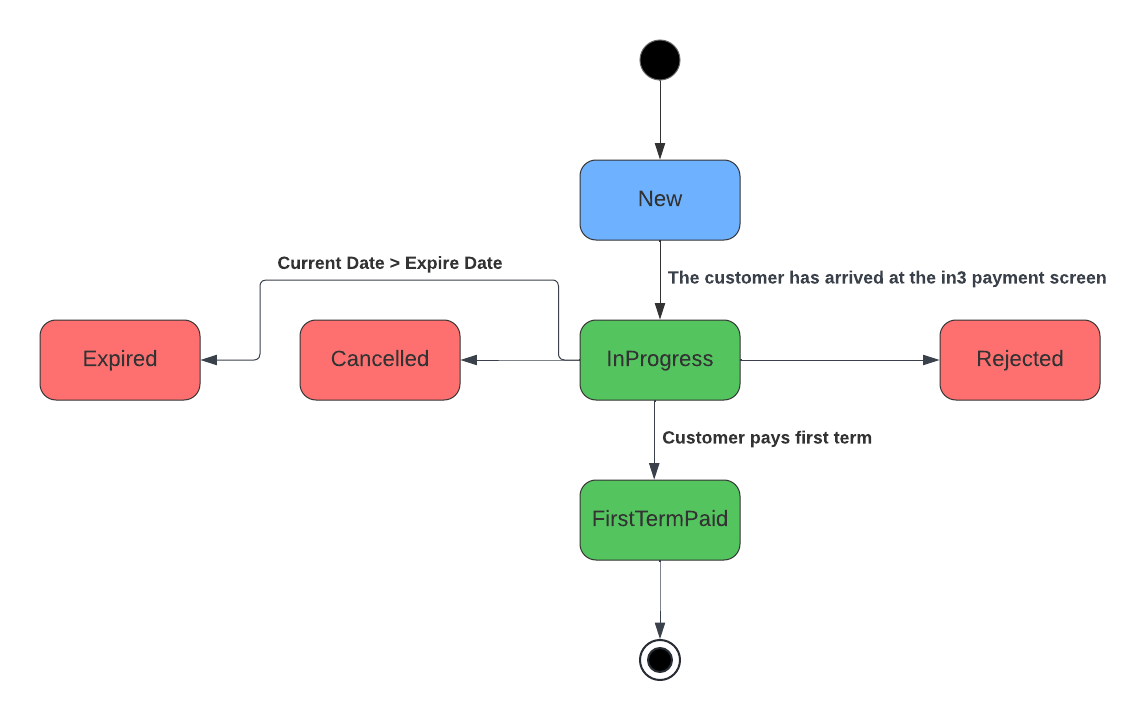
Status descriptions:
- 'New' - The transaction was created but the customer did not yet open the in3 payment screen.
- 'InProgress' - The customer has arrived at the in3 payment screen.
- 'Rejected' - The customer was not allowed to complete the checkout.
- 'FirstTermPaid' - The customer paid the first term and the transaction should be processed.
- 'Cancelled' - The customer voluntarily aborted the transaction.
- 'Expired' - The payment expired, expiration is provided by the PSPer. If not set on transaction creation the transaction will never expire.
The following state transitions are possible. Note that only the flow that ends in FirstTermPaid is considered a succesful flow. In all other cases, the payment did not go through and no goods should be shipped by the merchant.
Authorizations:
path Parameters
| transactionIdentifier required | string[a-zA-Z0-9\-]+ /api/transaction/{transactionIdentifier} (Returned by POST /api/transaction) |
Responses
Response samples
- 200
- 400
{- "status": "FirstTermPaid"
}Transaction list refunds
List all credits/restitutions/refunds for the specified transaction.
Authorizations:
path Parameters
| transactionIdentifier required | string[a-zA-Z0-9\-]+ /api/transaction/{transactionIdentifier} (Returned by POST /api/transaction) |
Responses
Response samples
- 200
- 400
[- {
- "RefundIdentifier": "15f69ac2-4c83-4171-b17c-3bc7773bb8df",
- "requestDate": "2022-02-23T16:46:34.3373917+01:00",
- "description": "Refund store",
- "amount": 23456,
- "fundsTranferConfirmedOn": "2022-02-23T16:46:34.3373917+01:00"
}
]Transaction refund
Creates a credit/restitution/refund for the specified order. Multiple refunds are allowed, but the sum of all refunds may not exceed the original invoice amount.
Authorizations:
path Parameters
| transactionIdentifier required | string[a-zA-Z0-9\-]+ /api/transaction/{transactionIdentifier} (Returned by POST /api/transaction) |
Request Body schema: application/json
| description required | string or null <= 256 characters The description of the refund. E.g. return number |
| amount required | number >= 1 The amount that should be refunded in cents. Cannot be higher than the original invoice amount |
Responses
Request samples
- Payload
{- "description": "2f5c43a5-570b-4206-b5fd-882ea51eb8c3",
- "amount": 24234
}Response samples
- 200
- 400
- 409
{- "identifier": "2Upb15Afx364f064d26Js26F80b73Q4d27b3cxy5fmEbCdbl"
}The following endpoints support seamless boarding also referred to as 'Ahead of time Onboarding'.
Create a merchant
MerchantId is generated by the Client (you) and sent to us in the 'Create merchant' call in the 'internalMerchantId' field.
Returns the state of the onboarding. If possible please reflect this state the Clients merchant facing back-office.
- Pending: iDEAL in3 has mailed the merchant but the merchant has not yet submitted an onboarding request
- InProgress: iDEAL in3 has received an onboarding request and is validating the merchant
- FeedbackReceived: iDEAL in3 has reviewed the onboarding request and requested the merchant to change certain fields
- DisabledByIn3: iDEAL in3 has rejected/disabled this merchant
- DisabledByPSPer: PSPer has rejected/disabled this merchant
- Active: iDEAL in3 has accepted the onboarding request and is ready to receive orders
Authorizations:
Request Body schema: application/json
| internalMerchantId required | string <= 64 characters The identifier used by Client (you) for the Merchant. |
| merchantName required | string <= 128 characters The name of the Merchant (e.g. 'DemoMerchant Financial Asset Holding G.M.B.H.', not 'DemoMerchant') |
| method | string or null Default: "IN3GRNT" Value: "IN3GRNT" The in3 method selected by the Merchant |
(AddressCompany (object or null)) The legal address of the Merchant | |
| cocNumber | string or null <= 64 characters The CoC number of the Merchant |
| vatNumber | string or null <= 64 characters The VAT identifier of the Merchant e.g. 'NL999999999B99' |
| iban | string or null <= 64 characters IBAN account number of the Merchant |
| ascription | string or null <= 64 characters The name of the legal entity that belongs to the IBAN number |
required | PsperShopContactRequestModel (object) The contact that is authorized to sign legal documents on behalf of the Merchant. This contact will receive a 'Welcome to in3' email when this shop is new to in3. This makes it a mandatory requirement to have at least one authorized contact. |
(PsperShopContactRequestModel (object or null)) The contact in3 can reach out to for financial questions | |
(PsperShopContactRequestModel (object or null)) The contact in3 can reach out to for marketing questions | |
(PsperShopContactRequestModel (object or null)) The contact in3 can reach out to for customer support questions | |
(PsperShopContactRequestModel (object or null)) The contact in3 can reach out to for technical questions | |
| variableFee | decimal or null The fee that PSP charges to merchant in % |
| fixedFee | decimal or null The fee that PSP charges to merchant in € |
| merchantPayoutDate | long or null When does PSP pay merchant? (in days after purchase) |
| pspPayoutDate | long or null When does in3 need to provide funds to PSP? (In days after purchase) |
| thirdPartyReseller | string or null <= 64 characters Third parties that are connected to the transaction, i.e. POS system or reseller partners. |
Responses
Request samples
- Payload
{- "internalMerchantId": "80041fe3-266b-4006-9579-03bd8ced0b04",
- "merchantName": "DemoMerchant Financial Asset Holding G.M.B.H.",
- "method": "IN3GRNT",
- "legalAddress": {
- "street": "Collse Heide",
- "city": "Nuenen",
- "houseNumber": "50",
- "houseNumberSuffix": "C",
- "postalCode": "5674VN",
- "region": "Noord-Brabant",
- "countryCode": "NL"
}, - "cocNumber": "70528500",
- "vatNumber": "NL999999999B99",
- "iban": "NL63RABO7608092459",
- "ascription": "DemoMerchant Financial Asset Holding G.M.B.H.",
- "authorizedContact": {
- "firstNames": "Henk",
- "lastName": "Jansen",
- "email": "h.jansen@payin3.nl",
- "phoneNumber": "+31651267472"
}, - "financialContact": {
- "firstNames": "Henk",
- "lastName": "Jansen",
- "email": "h.jansen@payin3.nl",
- "phoneNumber": "+31651267472"
}, - "marketingContact": {
- "firstNames": "Henk",
- "lastName": "Jansen",
- "email": "h.jansen@payin3.nl",
- "phoneNumber": "+31651267472"
}, - "supportContact": {
- "firstNames": "Henk",
- "lastName": "Jansen",
- "email": "h.jansen@payin3.nl",
- "phoneNumber": "+31651267472"
}, - "technicalContact": {
- "firstNames": "Henk",
- "lastName": "Jansen",
- "email": "h.jansen@payin3.nl",
- "phoneNumber": "+31651267472"
}, - "variableFee": 3.4,
- "fixedFee": 949.99,
- "merchantPayoutDate": 7,
- "pspPayoutDate": 7,
- "thirdPartyReseller": "Scenius"
}Response samples
- 400
{- "title": "One or more validation errors occurred.",
- "status": 400,
- "traceId": "|d9c6a3f6-46ab788e90ca4730.",
- "errors": {
- "Method": [
- "The field Method must match the regular expression '^(IN3GRNT)$'."
], - "CoCNumber": [
- "The CoCNumber field is required."
]
}
}Disable a merchant
Called when the PSPer/Merchant disables a Merchant. Please note that in3 will not actively reject orders incoming from a disabled Merchant, it is the PSPers responsibility to not start any orders for this merchant.
Authorizations:
path Parameters
| merchantId required | string[a-zA-Z0-9\-]+ The merchantId provided when creating the merchant in 'internalMerchantId' |
Responses
Create a shop
Creates a shop for the specified merchant.
MerchantId is generated by the Client (you) and sent to us in the 'Create merchant' call in the 'internalMerchantId' field.
Authorizations:
path Parameters
| merchantId required | string[a-zA-Z0-9\-]+ The merchantId provided when creating the merchant in 'internalMerchantId' |
Request Body schema: application/json
| internalShopId required | string <= 128 characters The identifier used by Client (you) for the Shop. |
| name required | string or null <= 128 characters The name of the shop (E.g. 'DemoMerchant', not 'Media Financial Asset Holding G.M.B.H.') |
(AddressCompany (object or null)) Address where the physical shop is located. Leave empty if there is no accessible store but only a webshop. | |
| websiteUrl | string or null <= 250 characters The website URL of the shop |
| categories | Array of strings or null The categories to which this shop belongs |
| customerSupportPhone | string or null The phone of the customer support |
| customerSupportEmail | string or null The email address of the customer support |
| platform | string or null The webshop platform used by the shop |
| expectedTraffic | integer or null The expected number of transactions per month for all payment methods. Used to classify the shop. |
| fixedFee | decimal or null Only set if requested by in3. The fixed cost of an in3 transaction. (1,50 = €1,50) |
| variableFee | decimal or null Only set if requested by in3. The variable cost of an in3 transaction as a percentage |
| mccCode required | string Merchant category code (MCC). A four-digit number listed in ISO 18245 for retail financial services. |
| mccDescription required | string Merchant category code (MCC) description: the description listed in ISO 18245 for retail financial services. |
Responses
Request samples
- Payload
{- "internalShopId": "1529251e-2d0d-4532-86c8-7b2c711fddc7",
- "name": "DemoMerchant",
- "shopAddress": {
- "street": "Collse Heide",
- "city": "Nuenen",
- "houseNumber": "50",
- "houseNumberSuffix": "C",
- "postalCode": "5674VN",
- "region": "Noord-Brabant",
- "countryCode": "NL"
}, - "categories": [
- "Televisions"
], - "customerSupportPhone": "+31403690149",
- "customerSupportEmail": "support@payin3.nl",
- "platform": "Magento2",
- "expectedTraffic": 1500,
- "fixedFee": 1.5,
- "variableFee": 1.5,
- "mccCode": "1234",
- "mccDescription": "Mollie"
}Response samples
- 400
{- "title": "One or more validation errors occurred.",
- "status": 400,
- "traceId": "|d9c6a3f6-46ab788e90ca4730.",
- "errors": {
- "Method": [
- "The field Method must match the regular expression '^(IN3GRNT)$'."
], - "CoCNumber": [
- "The CoCNumber field is required."
]
}
}Disable a shop
Called when the PSPer/Merchant disables a shop. Please note that in3 will not actively reject orders incoming from a disabled shop, it is the PSPers responsibility to not start any orders for a disabled shop.
Authorizations:
path Parameters
| merchantId required | string[a-zA-Z0-9\-]+ The merchantId provided when creating the merchant in 'internalMerchantId' |
| shopId required | string[a-zA-Z0-9\-]+ /api/onboarding/{merchantID} (Returned by POST /api/onboarding) |
Responses
Get informed when something relevant changes. Here you can setup which URL we should inform. All webhooks only inform you of the changed ID's so that you can fetch the latest status yourself completing the triangle.
Confirming HMAC on the receiving side of the webhook is as following:
- Combine the full response body with the unix timestamp from the response header:
"hmac_date", and seperate them with a semicolon.{"key":"value"};1646147678 - Encrypt the following value fully with SHA512, using the signing key from the creation request.
- If the result hash equals the hmac from the response header, you have a valid HMAC.
/// <summary>
/// Verifies HMAC from webhook
/// </summary>
/// <param name="hmac">Hmac header</param>
/// <param name="hmacDate">Hmac_date header</param>
/// <param name="jsonBody">The full response body</param>
/// <param name="signingKey">The signing key that was transmitted on the creation of the webhook.</param>
/// <returns></returns>
public bool VerifyHmac(string hmac, long hmacDate, string jsonBody, string signingKey)
{
    if (DateTimeOffset.FromUnixTimeSeconds(hmacDate) > DateTimeOffset.Now.AddMinutes(15))
    {
        // Timestamp in HMAC is too old, or modified.
        return false;
    };

    var payload = $"{jsonBody};{hmacDate}";

    var signingKeyDecoded = Convert.FromBase64String(signingKey);

    var signature = string.Empty;
    using (var hmacsha512 = new HMACSHA512(signingKeyDecoded))
    {
        var stream = new MemoryStream(Encoding.UTF8.GetBytes(payload));
        foreach (var b in hmacsha512.ComputeHash(stream))
        {
            signature = signature + $"{b:x2}";
        }
    }

    return hmac == signature;
}
Request samples
- HTTP
GET /api/v3/webhook HTTP/1.1
Host: webhook.partner.eu
x-hmac: b8b6fa39866b125555772e955107a641522a610091dcdc734c7a8d1ea1f92563f060e8ebb9263f7b5a3173191594320b6d50c7cc19d76be42e2df3ed1d3e4c20
x-hmac-date: 1656418731

{"test":"test"}

Signing_Key: PRHVXZL739Hu8kVaZyxzMUGGMe/w12Meuy9aRQo7BFxf7oYoepN/GsY3ZmCotsuJtoxSfYKpEEjsyvrAUWDyzA==
Response samples
- 200
[- {
- "id": "49e2576a-8cab-4ded-99fc-36feb779e69e",
- "name": "Failover event ingest - in3 onboarding",
- "expectedResponseMessage": "ACK",
- "expectedStatusCode": 200,
- "eventType": "OnboardingState",
- "retryPolicy": "Retry"
}
]Create a webhook
Authorizations:
Request Body schema: application/json
| name required | string <= 128 characters The name of the webhook |
| url required | string <= 2048 characters The URL in3 will call |
| eventType required | string Enum: "TransactionState" "OnboardingState" "FraudState" The type of events this webhook should receive |
| expectedResponseMessage | string or null <= 25 characters Default: null The response body we should expect to consider the callback successful. Empty is always OK |
| expectedStatusCode | number or null Default: 200 The response body we should expect to consider the callback successful. |
| retryPolicy | string Default: "NoRetry" Enum: "NoRetry" "Retry" With the retry policy we will retry the call a few more times with increasing interval |
Responses
Callbacks
Request samples
- Payload
- HTTP
{- "name": "Failover event ingest - in3 onboarding",
- "eventType": "OnboardingState",
- "expectedResponseMessage": "ACK",
- "expectedStatusCode": 200,
- "retryPolicy": "Retry"
}Response samples
- 200
- 400
{- "id": "49e2576a-8cab-4ded-99fc-36feb779e69e",
- "name": "Failover event ingest - in3 onboarding",
- "eventType": "OnboardingState",
- "expectedResponseMessage": "ACK",
- "expectedStatusCode": 200,
- "retryPolicy": "Retry",
- "signingKey": "FX0369C0DN0402H3DB0SIJSLW0E2HAQ4"
}Callback payload samples
{- "id": 294241568,
- "event": "OnboardingState",
- "entityId": "49e2576a-8cab-4ded-99fc-36feb779e69e"
}Delete a webhook
Authorizations:
path Parameters
| webhookId required | string[a-zA-Z0-9\-]+ /api/webhook/{webhookId} |
Responses
Request samples
- HTTP
DELETE /api/v3/webhook/521a61c8-ba9d-4c16-95f3-08d9c3024e15 HTTP/1.1
Host: webhook.partner.eu
x-hmac: b8b6fa39866b125555772e955107a641522a610091dcdc734c7a8d1ea1f92563f060e8ebb9263f7b5a3173191594320b6d50c7cc19d76be42e2df3ed1d3e4c20
x-hmac-date: 1656418731

{"test":"test"}

Signing_Key: PRHVXZL739Hu8kVaZyxzMUGGMe/w12Meuy9aRQo7BFxf7oYoepN/GsY3ZmCotsuJtoxSfYKpEEjsyvrAUWDyzA==